What’s My Lane?

Yesterday a fellow #SQLFamily member, Brent Ozar tweeted about how someone objected to some content in his latest email he sends out to subscribers. Based on the response, I’m guessing it was this email.

Now, let me back up and in full disclosure say I’ve met Brent once or twice, sat in on a SQLSaturday session of his and one User Group meeting where he presented, but don’t know him well. We’ve never sat down and had a beer or discussed DBA topics together. And, in fairness, my blog on a good day probably gets 1/1000th the reads his blog will get on a bad day. He’s what some might call “a big name” in the industry. He’s an expert on SQL Server and well worth reading for that reason alone. I can’t guess how many people read his blog or newsletter, but I can say it has influence.

And so, someone felt that him writing about something other than how to build an index, or why not to use an update in a trigger was him straying from his lane and he should stick with data related topics. He’s already responded in some tweets and I presume elsewhere but I figured it was a good topic for me to blog about.

As long-time readers know, I don’t write just about SQL or PowerShell, but I also write about cave rescue or marshmallows or Safety (one of my more popular pages strangely). In other words I have an eclectic array of topics. But I also have some themes and I’ve written about (not) being an ally, or gender factors in giving blood. There are others, but the general point is I sometimes also write about social issues I think that are important. I think I’d be hard pressed to say what my lane is here; perhaps it’s more like a curvy mountain road?

But let’s go back to the person who told Brent he should stay in his lane. What lane did that reader refer to? I’m presuming it’s a narrow lane of “topics related to databases”. But, I think that person is wrong and I fully support Brent’s “straying from his lane.” Why? Because of power and privilege.

I’m going to go out on a limb (though I suspect it’s not a very far one) and state that I suspect Brent and I share much of the same privileges simply by being born the gender we are and skin color we have. There are other aspects we probably share.

These innate privileges give us power. And sometimes we are consciously aware of that power and other times unconsciously blind to it. Having the power and privilege itself isn’t an issue. It’s how it’s used that is important.

For example, all too often, I forget that I’m more likely to be taken seriously when I talk about a technical topic than some of my fellow DBAs, simply because of my gender and/or skin color. I can be unconscious to that power and privilege or I can work to be conscious of it. And by being conscious I can try to improve the situation for my fellow DBAs who don’t have my innate privileges.

I can be ignorant of that fact that no one questions my marriage and be oblivious to how some had to wait for the Supreme Court to recognize the validity of their love for their partners. Or, I can be aware of that and support my LGBTQI brethren in being allowed to live with who they choose and to marry them if I wish. This shapes my political opinions and who I will vote for. For example, I won’t vote for someone that I think will act to take away same sex marriage or will enact legislation that hurts such folks.

But there’s also more conscious forms of power. Simply being aware is not enough. Making room for others to be heard is a positive use of power. This is what Brent did and I fully support it. But, he didn’t simply make room, he provided the metaphorical microphone and the loudspeakers. If you didn’t look at the link above, look now. You’ll note that Brent didn’t write the email in question, but rather he gave space to a fellow DBA, Andy Mallon. This wasn’t an accident, this wasn’t Brent being lazy and not wanting to write an email, this was a conscious choice. This is using his power as a well known DBA and “big name in the industry” as well as his privileges to give a voice to others. (Please note, Andy’s a friend of mine, I’ve spoken with him at SQL Saturdays and he’s no slouch, but as far as I know he doesn’t have the audience that Brent has.)

I can support that use of power and if it’s “straying from his lane” so be it!

That said, as I wrote in my article in giving blood, as DBAs, we can NOT simply divorce ourselves from social issues. It’s not as simple as “well I just write SELECT statements and create tables.” The very data we record encodes social standards. When we make gender a bit field, we’re enshrining a very binary view of gender that does not reflect the lived lives of those around us. When we make fields that say Husband or Wife, rather than Spouse 1/Spouse 2, we are saying that only a certain form of marriage is valid (And for that matter, why stop at Spouse 2, why not make it a separate table for the day when someone walks in and claims to have more than one spouse.)

In other words, even if Brent had never strayed from writing about SQL Server, his lane would properly include social issues. Data isn’t nor should it be completely separate from social issues.

And I’ll toss out a few URLs here:

P.S. for those who read my post last week, I’m happy to say I got my slide deck and recording uploaded for presentation at PASS Virtual Summit 2020: PowerShell for DBA Beginners! So join me on Nov 11th at 2:00 PM! And use code LGDISIIK3 and save $50!

A Speaker’s Timeline

This post will be short, for reasons that are hopefully obvious by the end.

Sometime in February

Hmm, I should put together some ideas to submit to present to SQL Summit in Houston (not Dallas as Mistress SQL pointed out to me) this year.

March 16th

An update, the call for speakers has been postponed. Darn.

March 23rd

Call for speakers is finally open!

March 30th

Submit 3 possible topics.

April 1st

Approach a fellow speaker about a possible joint session, but after discussion, decide not to go ahead with the idea.

June 3rd

Get an update, Summit will be virtual this year. Thankfully I didn’t book any tickets or hotel rooms in Dallas.

July 20th 6:49 PM EDT

Woohoo! I got the email! One of my submissions got selected to present!

July 20th 6:50 PM EDT

Crap, now I actually have to write the entire thing!

July 20th 6:51 PM EDT

Wait, and it’s going to be virtual too. That’s going to make it a bit more of a challenge to present. But I’m up to it!

Sometime in August

I really should get started. Hmm, here’s one of the scripts I want to present.

But honestly, I’m preparing to teach a bunch of cavers and medical students cave rescue, I need to concentrate on that first.

September 5th

I just biked over 100 miles. I’m certainly not working on my presentation THIS weekend.

Later in September

Ok, now I’m going to sit down and really work through this. Here’s a basic outline.

October 1st

Oh wait, it’s going to be virtual AND I have to prerecord it? How is that supposed to work? I had better read up at the speaker portal!

October 2nd

Huh, ok, that sorta makes sense, upload the slides, do a recording, but I still don’t get how it’ll work with a presentation like mine with lots of demos. Well I’ll figure it out.

October 6th around 11 PM EDT

Well the PowerPoint template deck they provided looks pretty slick. I should start prepping my slides.

October 6th, approximately 5 minutes later

There, got the first slide done. Of course it’s only my name and pronouns, etc. But it’s a start.

Oh and the 2nd slide is done, but that’s simply the default PASS slide talking about chapters, SQL Saturday etc, so technically I didn’t do anything there.

I’ll start working on the closing slides.

October 7th, sometime after midnight

Ok, about 5 slides done. I’ll like to myself and say I’ve made great progress!

October 9th, approximately 10:00 PM EDT

Ok, I’ll at least start writing out the scripts I need.

October 9th, 20 minutes later

What the bloody hell? Why is this script failing? I’ve got to present this. If I can’t get this script working how is anyone going to believe that I know PowerShell, let alone actually use it.

October 9th, 5 minutes later

Well, damn, that was an embarrassing mistake, just had the , in the wrong place

October 10th around 9:00 PM EDT

Hmm, to properly demo this, I really need to run against 3-4 SQL Servers and I really don’t want to spin up a bunch of VMS and I can’t use my development one, too much proprietary data there.

I know, NOW is a perfect time to start to learn to use Docker! Why not? And besides Cathrine Wilhemsen has a great post on it. I’ll simply follow that.

2 hours and 1 reboot later

Hey, would you look at that? I’ve actually got a docker container running SQL. This is awesome!

Another minute later

But why can’t I actually connect? What network is it on? Why did I decide docker was easier? Why did I even submit this proposal? What the heck am I doing here? What is the meaning of life?

5 more minutes

That’s it, I’m going to bed.

October 11th, late night

Oh, I get it it now, I didn’t setup a full separate network, it’s bridged and that’s why it’s showing 0.0.0.0. I just need to change the port and I’m good to go!

A minute later

This is pretty awesome. Not what I’d do for a production setup, but definitely works for my demos. Now if I were really smart, I’d also setup persistent storage and the like, but this is good enough. And honestly now, setup a loop, increment a variable and bam, I’ve got 4 instances of SQL running in docker, 2 are 2017 and 2 are 2019. This is really incredible. I’m proud of myself.

Oh and even better, I’m doing all this in a PowerShell script, so I can actually make it PART of my presentation!

October 12th 2:26 PM EDT

Send off an email to the Program folks at PASS asking about how the recording stuff works with demos. Eagerly awaiting a reply.

October 15th, another late night

Yes, there’s a theme here, much of my work is being done late at night. It seems to work for me. But dang that deadline is getting closer!

October 16th, late night, again

Watched some Schitt$ Creek with the family. “Why didn’t we start watching this sooner? It’s hilarious! But I need to work on my presentation some more.”

Get all the PowerShell scripts basically done. I’m happy with it, need to work on my speaking script some.

October 19th 3:00 PM EDT

Get off the phone with a fellow Cave Rescue expert. Just before I get off, I mention my upcoming virtual, prerecorded session I have to finish. He says, “Oh, you know I just did 2-3 of those for a rescue conference, exact same format. It worked out really well. I can send you some details and feedback.”

I find that reassuring.

Also recheck email, still no answer from the folks at PASS on my questions about demos, etc.

October 19th, guess what time

I’ve finished everything, even updated the slides and scripts a bit more. I’m a bit worried I’m going to run too long, but decide to do my first of several practice run throughs.

Do my first full run through. Stop and correct a few mistakes or rough edges here and there. I’m not too worried if I run over now since I know I’ve artificially added some time.

October 19th, 42 minutes later

I get done, look at the PowerPoint timer: 42 minutes. “CRAP! I need this to be 60 minutes!” I’m not too worried, I can add more, but I’m not sure where and I don’t want to simply add fluff for the sake of fluff. I need to give this some thought.

Later on October 19th

Talking to a friend of mine who among other things has a background in adult education. She doesn’t know SQL or PowerShell, but she’s a good sounding board and she’s going to sit through my next run-through, not so much for the technical details but to give feedback on the flow and perhaps suggestions on where I may be making too many assumptions on what my listeners will know.

October 20th Early Morning

It’s a Tuesday, time to blog. As always I face that question, what should I blog about?

“I know, I’ll blog about how I’m getting my presentation together and the deadline is fast approaching. I can’t be the only speaker that often finds themselves up against the deadline and panicking.”

Next 36 hours

Add a bit more content and run through it 2-3 more time and then… RECORD! (technically it looks like I have until the 26th to upload my recording, but I want to get done early).

Conclusion

The above may or may not be a wholly accurate timeline or description of the process I’ve gone through trying to get my presentation ready for Pass Virtual Summit. I may have elided a few details and over-hyped a few others, but in general it’s close to true and accurate. Despite my always best intentions, I find myself often working up close to the deadline for submissions. Since for Summit they want NEW presentations, I can’t simply dust-off one of my previous presentations and use that, so there’s definitely more work involved here.

And honestly up until I learned it was going to be prerecorded, I thought I’d have most of October to work on it. The deadline to get the slides and recordings submitted sort of threw my original timeline for working on it in the dumpster so I’m actually a bit further behind than I expected to be.

On the other hand, I really did learn to use Docker and I think that’s valuable and I am making that part of my presentation. And, when all is said and done, I think I’ll be happy with it. I think though like any good speaker, I’ll look back and think “well next time, I’ll have to improve this or that.” There’s always room for improvement. I’m not keen on giving it prerecorded. I value the instantaneous feedback I get from the audience. So that will be different. But I at least can elicit questions during the presentation and there’s a life Q&A afterwards. But, I’ll still be nervous.

I’m in awe of speakers who get their presentations all prepped and prepared months in advance, but I suspect there’s a number out there like me, that don’t operate that way. And I suspect there’s a few who are even more nervous than I thinking, “OMG, am I the only one in this spot?” Nope, you’re not. Or rather, “Please let me know I’m not the only one!”

See you all at Summit, at least virtually!

And in the meantime there’s another possible deadline coming up I need to think about…

#SQLFamily

I’ve mentioned this in the past and thought I’d write something quick about it today. The quick is because I’m lacking time, not because the topic isn’t important or worthy of exposition.

Anyone who has spent much time at any PASS events such as SQL Saturday or Pass Summit has an inkling of what #SQLFamily is.

At its base, it’s a group of professionals who all have SQL Server in common. That might be a start, but it’s hardly a good definition. It’s also:

  • Professional contacts
  • LOTS of people willing to give SQL help when you need to solve a problem
  • Folks that will fact check your blog or post
  • It’s the folks willing to step up for a User Group Meeting talk

And that might be enough, but that’s not all it’s also:

  • Someone who loves bicycling as much or more than me.
  • At least one amateur radio operator (and quite the ham in other ways at times)
  • Several with 3D printers making mask band holders and the like
  • Several that sing karaoke
  • Someone who makes more homemade pizza than I do
  • At least one with cute puppies she’s been known to have on her webinars

But, honestly, it doesn’t end there. In this time of Covid it’s been more.

  • It’s been the folks who I get together with on Friday’s for a long-distance social hour
  • It’s the ones I’ve been able to talk about fears of COVID and schooling and kids
  • It’s been the ones I’ve reached out to to make sure they’re ok
  • It’s been the ones that have checked in on me
  • It’s the folks that write blog posts, sometimes daily, about how to support others

In short it really is a family. We’re not together by blood but we still share our thoughts and feelings and support each other. And you know what, right now I’m extremely grateful for that family.

So to my #SQLFamily, if I haven’t said it enough, thank you for who you are and for being there, especially during this time of Covid. I know I’ve needed it. And I really appreciate it.

And I can’t wait to see you all in person again at some point.

P.S. – if you’re shy or don’t think you’re welcome in the family, don’t worry, you are welcome. Pop in, say hi, or even just reach out to one person and say hi or ask for an introduction.

Caving and SQL

Longtime readers know that I spend a lot of my time talking about and teaching caving, more specifically cave rescue, and SQL Server, more specifically the operations side. While in some ways they are very different, there are areas where they overlap. In fact I wrote a book taking lessons from both, and airplane crashes to talk about IT Disaster Management.

Last week is a week where both had an overlap. One of the grottoes in the NSS (think like a SQL User Group) sponsored a talk on Diversity and Inclusion in the caving community. The next day, SQL Pass had a virtual panel on the exact same subject.

Welcoming

Let me start with saying that one thing I appreciate about both communities is that they will welcome pretty much anyone. You show up and ask to be involved and someone will generally point you in the right direction.  In fact several years ago, I heard an Oracle DBA mention how different the SQL community was from his Oracle experience, and how welcoming and sharing we could be.

This is true in the caving community. I recall an incident decades ago where someone from out of town called up a caving friend he found in the NSS memberhsip manual and said, “hey, I hear you go caving every Friday, can I join you?” The answer was of course yes.  I know I can go many places in this country, look up a caver and instantly be pointed to a great restaurant, some great caves and even possibly some crash space to sleep.

So let’s be clear, BOTH communities are very welcoming.

And I hear that a lot when the topic of diversity and inclusion comes along. “Oh we welcome anyone. They just have to ask.”

But…

Well, there’s two issues there and they’re similar in both communities. The less obvious one is that often anyone is welcome, but after that, there’s barriers, some obvious, some less so. Newcomers start to hear the subtle comments, the subtle behaviors. For example, in caving, modesty is often not a big deal. After crawling out of a wet muddy hole, you may think nothing of tearing off your clothes in the parking lot and changing. Perhaps you’re standing behind a car door but that’s about it. It’s second nature, it’s not big deal. But imagine now that you’re the only woman in that group. Sure, you were welcomed into the fold and had a blast caving, how comfortable are you with this sudden lack of modesty? Or you’re a man, but come from a cultural or religious background where modesty is a high premium?

In the SQL world, no one is getting naked in the datacenters (I hope). But, it can be subtle things there too. “Hey dudes, you all want to go out for drinks?” Now many folks will argue, “dudes is gender neutral”. And I think in most cases it’s INTENDED to be. But, turn around and ask them, “are you attracted to dudes?” and suddenly you see there is still a gender attached.  There’s other behaviors to. There’s the classic case of when a manager switched email signatures with one of his reports and how the attitudes of the customers changed, simply based on whose signature was on the email.

So yes, both groups definitely can WELCOME new folks and folks outside of the majority, but do the folks they welcome remain welcomed? From talking to people who aren’t in the majority, the answer I often get is “not much.”

An Interlude

“But Greg, I know….” insert BIPOC or woman or other member of a minority.  “They’re a great DBA” or “They’re a great caver! Really active in the community.”  And you’re right. But you’re also seeing the survivorship bias. In some cases, they did find themselves in a more welcoming space that continued to be welcoming. In some cases you’re seeing the ones who forged on anyway. But think about it, half our population is made up of women. Why aren’t 1/2 our DBAs?  In fact, the number of women in IT is declining! And if you consider the number of women in high school or college who express an interest in IT and compare it to those in in their 30s, you’ll find the number drops. Women are welcome, until they’re not.

In the caving community during an on-line discussion where people of color were speaking up about the barriers they faced, one person, a white male basically said, “there’s no racism in caving, we’ll welcome anyone.”  A POC pointed out that “as a black man in the South, trust me, I do NOT feel safe walking through a field to a cave.”  The white man continued to say, “sure, but there’s no racism in caving” completely dismissing the other responder’s concerns.

There’s Still More…

The final point I want to make however is that “we welcome people” is a necessary, but not sufficient step. Yes, I will say pretty much every caver I know will welcome anyone who shows an interest. But that’s not enough. For one thing, for many communities, simply enjoying the outdoors is something that’s not a large part of their cultural.  This may mean that they’re not even aware that caving is a possibility. Or that even if it is, they may not know how to reach out and find someone to take them caving.

Even if they overcome that hurdle, while caving can be done on the cheap, there is still the matter of getting some clothing, a helmet, some lights. There’s the matter of getting TO the cave.

In the SQL world, yes anyone is welcome to a SQL Saturday, but what if they don’t have a car? Is mass transit an option? What if they are hearing impaired? (I’ve tried unsuccessfully 2 years in a row to try to provide an ASL interpreter for our local SQL Saturday. I’m going to keep trying). What if they’re a single parent? During the work week they may have school and daycare options, but that may not be possible for a SQL Saturday or even an afterhours event. I even had something pointed out to me, during my talk on how to present, that someone in the audience had not realized up until I mentioned it, that I was using a laser pointer. Why? Because they were colorblind and never saw the red dot. It was something that I, a non-colorblind person had never even considered. And now I wonder, how many other colorblind folks had the same issue, but never said anything?

In Conclusion

It’s easy and honestly tempting to say, “hey, we welcome anyone” and think that’s all there is to it. The truth is, it takes a LOT more than that. If nothing else, if you’re like me, an older, cis-het white male, take the time to sit in on various diversity panels and LISTEN. If you’re invited to ask questions or participate, do so, but in a way that acknowledges your position. Try not to project your experiences on to another. Only once have I avoided a field to get to a cave, because the farmer kept his bull there. But I should not project MY lack of fear about crossing a field onto members of the community who HAVE experienced that.

Listen for barriers and work to remove them. Believe others when they mention a barrier. They may not be barriers for you, but they are for others. When you can, try to remove them BEFORE others bring them up. Don’t assume a barrier doesn’t exist because no one mentions it. Don’t say, “is it ok if I use a red laser pointer?” because you’re now putting a colorblind person on the spot and singling them out. That will discourage them. For example find a “software” pointer (on my list of things to do) that will highlight items directly on the screen. This also works great for large rooms where there may be multiple projection screens in use.

If caving, don’t just assume, “oh folks know how to find us” reach out to community groups and ask them if they’re interested and offer to help. (note I did try this this year, but never heard back and because of the impact of Covid, am waiting until next year to try again.)

Don’t take offense. Unless someone says, “hey, Greg, you know you do…” they’re not talking about you specifically, but about an entire system. And no one is expecting you to personally fix the entire system, but simply to work to improve it where you can. It’s a team effort. That said, maybe you do get called out. I had a friend call me out on a tweet I made. She did so privately. And she did so because, she knew I’d listen. I appreciated that. She recognized I was human and I make mistakes and that given the chance, I’ll listen and learn. How can one take offense at that? I saw it has a sign of caring.

Finally realize, none of us are perfect, but we can always strive to do better.

So, today give some thought about how you can not only claim your community, whatever it may be, is welcoming, but what efforts you can make to ensure it is.


On a separate note, check out my latest writing for Red-Gate, part II on Parameters in PowerShell.

SQL Saturday Albany 2020

So, another SQL Saturday Albany is in the books. First, I want to thank Ed Pollack and his crew for doing a great job with a changing and challenging landscape.  While I handle the day to day and monthly operations of the Capital Area SQL Server User Group, Ed handles the planning and operations of the SQL Saturday event. While the event itself is only 1 day of the year, I suspect he has the harder job!

This year of course planning was complicated by the fact that the event had to become a virtual event. However, it’s a bit ironic we went virtual because in many ways, the Capital District of NY is probably one of the safer places in the country to have an in-person event. That said, virtual was still by far the right decision.

Lessons Learned

Since more and more SQL Saturdays will be virtual for the foreseeable future, I wanted to take the opportunity to pass on some lessons I learned and some thoughts I have about making them even more successful. Just like the #SQLFamily in general passing on knowledge about SQL Server, I wanted to pass on knowledge learned here.

For Presenters

The topic I presented on was So you want to Present: Tips and Tricks of the Trade. I think it’s important to nurture the next generation of speakers. Over the years I was given a great deal of encouragement and advice from the speakers who came before me and I feel it’s important to pass that on. Normally I give this presentation in person. One of the pieces of advice I really stress in it is to practice beforehand. I take that to heart. I knew going into this SQL Saturday that presenting this remotely would create new challenges. For example, on one slide I talk about moving around on the stage. That doesn’t really apply to virtual presentations. On the other hand, when presenting them in person, I generally don’t have to worry about a “green-screen”. (Turns out for this one I didn’t either, more on that in a moment.)

So I decided to make sure I did a remote run through of this presentation with a friend of mine. I can’t tell you how valuable that was. I found that slides I thought were fine when I practiced by myself didn’t work well when presented remotely. I found that the lack of feedback inhibited me at points (I actually do mention this in the original slide deck). With her feedback, I altered about a 1/2 dozen slides and ended up adding 3-4 more. I think this made for a much better and more cohesive presentation.

Tip #1: Practice your virtual presentation at least once with a remote audience

They don’t have to know the topic or honestly, even have an interest in it. In fact I’d argue it might help if they don’t, this means they can focus more on the delivery and any technical issues than the content itself. Even if you’ve given the talk 100 times in front of a live audience, doing it remotely is different enough that you need feedback.

Tip #2: Know your presentation tool

This one actually came back to bite me and I’m going to have another tip on this later. I did my practice run via Zoom, because that’s what I normally use. I’m used to the built-in Chroma Key (aka green-screen) feature and know how to turn it on and off and to play with it. It turns out that GotoWebinar handles it differently and I didn’t even think about it until I got to that part of my presentation and realized I had never turned it on, and had no idea how to! This meant that this part of my talk didn’t go as well as planned.

Tip #3: Have a friend watch the actual presentation

I actually lucked out here, both my kids got up early (well for them, considering it was a weekend) and watched me present. I’m actually glad I didn’t realize this until the very end or else I might have been more self-conscious. That said, even though I had followed Tip #1 above, they were able to give me more feedback. For example, (and this relates to Tip #2), the demo I did using Prezi was choppy and not great. In addition, my Magnify Screen example that apparently worked in Zoom, did not work in GotoWebinar! This feedback was useful. But even more so, if someone you know and trust is watching in real-time, they can give real-time feedback such as issues with bandwidth, volume levels, etc.

Tip #4: Revise your presentation

Unless your presentation was developed exclusively to be done remotely, I can guarantee that it probably need some changes to make it work better remotely. For example, since most folks will be watching from their computer or phone, you actually may NOT need to magnify the screen such as you would in a live presentation with folks sitting in the back of the room. During another speaker’s presentation, I realized they could have dialed back the magnification they had enabled in SSMS and it would have still been very readable and also presented more information.

You also can’t effectively use a laser pointer to highlight items on the slide-deck.

You might need to add a few slides to better explain a point, or even remove some since they’re no longer relevant. But in general, you can’t just shift and lift a live presentation to become a remote one and have it be as good.

Tip #5: Know your physical setup

This is actually a problem I see at times with in-person presentations, but it’s even more true with virtual ones and it ties to Tip #2 above. If you have multiple screens, understand which one will be shown by the presentation tool. Most, if not all, let you select which screen or even which window is being shared. This can be very important. If you choose to share a particular program window (say PowerPoint) and then try to switch to another window (say SSMS) your audience may not see the new window. Or, and this is very common, if you run PowerPoint in presenter mode where you have the presented slides on one screen, and your thumbnails and notes on another, make sure you know which screen is being shared. I did get this right with GotoWebinar (in part because I knew to look for it) but it wasn’t obvious at first how to do this.

In addition, decide where to put your webcam! If you’re sharing your face (and I’m a fan of it, I think it makes it easier for others to connect to you as a presenter) understand which screen you’ll be looking at the most, otherwise your audience may get an awkward looking view of you always looking off to another screen. And, if you can, try to make “eye contact” through the camera from time to time. In addition, be aware, and this is an issue I’m still trying to address, that you may have glare coming off of your glasses. For example, I need to wear reading glasses at my computer, and even after adjusting the lighting in the room, it became apparent, that the brightness of my screens alone was causing a glare problem. I’ll be working on this!

Also be aware of what may be in the background of your camera. You don’t want to have any embarrassing items showing up on your webcam!

For Organizers

Tip #6: Provide access to the presentation tool a week beforehand

Now, this is partly on me. I didn’t think to ask Ed if I could log into one of the GotoWebinar channels beforehand, I should have. But I’ll go a step further. A lesson I think we learned is that as an organizer, make sure presenters can log in before the big day and that they can practice with the tool. This allows them to learn all the controls before they go live. For example, I didn’t realize until 10 minutes was left in my presentation how to see who the attendees were. At first I could only see folks who had been designated as a panelist or moderator, so I was annoyed I couldn’t see who was simply attending. Finally I realized what I thought was simply a label was in fact a tab I could click on. Had I played with the actual tool earlier in the week I’d have known this far sooner.  So organizers, if you can, arrange time for presenters to log in days before the event.

Tip #7: Have plenty of “Operators”

Every tool may call them by different names but ensure that you have enough folks in each “room” or “channel” who can do things like mute/unmute people, who can ensure the presenter can be heard, etc. When I started my presentation, there was some hitch and there was no one around initially to unmute me. While I considered doing my presentation via interpretive dance or via mime, I decided to not to. Ed was able to jump in and solve the problem. I ended up losing about 10 minutes of time due to this glitch.

Tip #8: Train your “Operators”

This goes back to the two previous tips, make sure your operators have training before the big day. Setup an hour a week before and have them all log in and practice how to unmute or mute presenters, how to pass control to the next operator, etc. Also, you may want to give them a script to read at the start and end of each session. “Good morning. Thank you for signing in. The presenter for this session will be John Doe and he will be talking about parameter sniffing in SQL Server. If you have a question, please enter it in the Q&A window and I will make sure the presenter is aware of it. This session is/isn’t being recorded.” At the end a closing item like, “Thank you for attending. Please remember to join us in Room #1 at 4:45 for the raffle and also when this session ends, there will be a quick feedback survey. Please take the time to fill it out.”

Tip #9: If you can, have a feedback mechanism

While people often don’t fill out the written feedback forms at a SQL Saturday, when they do, they can often be valuable. Try to recreate this for virtual ones.

Tip #10Have a speaker’s channel

I hadn’t given this much thought until I was talking to a fellow speaker, Rie Irish later, and remarked how I missed the interaction with my fellow speakers. She was the one who suggested a speaker’s “channel” or “room” would be a good idea and I have to agree. A private room where speakers can log in, chat with each other, reach out to operators or organizers strikes me as a great idea. I’d highly suggest it.

Tip #11: Have a general open channel

Call this the “hallway” channel if you want, but try to recreate the hallway experience where folks can simply chat with each other. SQL Saturday is very much a social event, so try to leverage that! Let everyone chat together just like they would at an in-person SQL Saturday event.

For Attendees

Tip #12: Use social media

As a speaker or organizer, I love to see folks talking about my talk or event on Twitter and Facebook. Please, share the enthusiasm. Let others know what you’re doing and share your thoughts! This is actually a tip for everyone, but there’s far more attendees than organizers/speakers, so you can do the most!

Tip #13: Ask questions, provide feedback

Every platform used for remote presentations offers some sort of Q&A or feedback. Please, use this. As a virtual speaker, it’s impossible to know if my points are coming across. I want/welcome questions and feedback, both during and after. As great as my talks are, or at least I think they are, it’s impossible to tell without feedback if they’re making an impact. That said, let me apologize right now, if during my talk you tried to ask a question or give feedback, because of my lack of familiarity with the tool and not having the planned operator in the room, I may have missed it.

Tip #14: Attend!

Yes, this sounds obvious, but hey, without you, we’re just talking into a microphone! Just because we can’t be together in person doesn’t mean we should stop learning! Take advantage of this time to attend as many virtual events as you can! With so many being virtual, you can pick ones out of your timezone for example to better fit your schedule, or in different parts of the world! Being physically close is no longer a requirement!

In Closing

Again, I want to reiterate that Ed and his team did a bang-up job with our SQL Saturday and I had a blast and everyone I spoke to had a great time. But of course, doing events virtually is still a new thing and we’re learning. So this is an opportunity to take the lessons from a great event and make yours even better!

I had a really positive experience presenting virtually and look forward to my PASS Summit presentation and an encouraged to put in for more virtual SQL Saturdays after this.

In addition, I’d love to hear what tips you might add.

A Summit To Remember

There’s been a lot of talk about the 2020 PASS Summit and how the impact of making it virtual this year. I’ve even previously written about it. I’ll be clear, I would prefer an in-person summit. But that said, I think having it virtual does provide for some fascinating and interesting possibilities and I look forward to seeing how they’re handled.  It will certainly be different being able to watch a session at a later time as a default option. And my understanding is that session schedules will no longer be constrained by the timezone the Summit is being held in.

That said, I also have to admit a certain bias here. I’ve wanted to speak at Summit for a couple of years now and have been turned down twice in the past two years. This year I was hoping again to speak, but alas, I procrastinated a bit too long and literally missed the original window to submit by a few hours.

Note I said original window. Because the Summit was moved to a virtual Summit the decision was made to re-open the call for speakers. This time I took advantage of that 2nd chance and submitted a bid.

And I’m so glad I did. Because if you didn’t have a reason to attend summit before, you do now! You get to hear me talk about PowerShell! So, I’ll admit to getting an unexpected benefit out of the move to a Virtual Summit.

I still recall one of my first attempts to use PowerShell at a client site, about 8 years ago. It did not go well. The security policy wouldn’t let me do what I wanted and the available knowledge on the Internet was sparse. Basically I wanted to loop through a list of servers and see if they had SQL Server installed. I eventually gave up on that project.

Since then though, I’ve been drawn to PowerShell and have come to love it. Now, when you hear a DBA talk about PowerShell, they will almost always mention dbatools. I want to go on record right now, I think it’s a GREAT addition, but I rarely use it. Not because there’s anything wrong with it, but mostly because my current usage is a bit different than what it provides. I do talk about it a bit here though.

For the talk I’ll be presenting, my plan is to start with a real simple PowerShell Script and slowly build on it until it’s a useful script for deploying SQL Scripts to multiple servers. For anyone who has read my articles at Red-Gate, much of this will be familiar territory, but I hope to cover in 75 minutes what I cover in 3-4 articles.

Checking this morning, I noticed that I’m among good company, and it’s humbling to see it, when it comes to speaking about PowerShell.

So, I hope you “come” and see me present on PowerShell at SQL Summit 2020. I’ll be in New York, where will you be?

Giving Blood and Pride Month

I gave blood yesterday. It got me thinking. First, let me show a few screenshots:

male blood donor shot 1

7 Male Donor #1 screen shot

female blood donor shot 1

Female Donor #1 screen shot

Let me interject here I’m using the terms Male and Female based on the criteria I selected in the American Red Cross’s Fast Pass screen. More on why I make that distinction further on. But first two more screen shots.

female blood donor shot 2

Pregnancy question highlighted for female

male blood donor shot 2

No pregnancy question for males

Now, on the face of it, this second set of questions especially almost seems to make sense: I mean if I answered Male early on in the questionnaire, why by asked about a pregnancy? But what I’m asked at the beginning is about my gender, not my actual child-bearing capability. Let me quote from Merriam-Webster:

2-b: the behavioral, cultural, or psychological traits typically associated with one sex

Or from the World Health Organization:

Gender refers to the roles, behaviours, activities, attributes and opportunities that any society considers appropriate for girls and boys, and women and men. Gender interacts with, but is different from, the binary categories of biological sex.

Who can be pregnant?

So above, really what the Red Cross is asking isn’t about my gender, but really my ability to be pregnant. Now, this is a valid medical concern. There are risks they want to avoid in regards to pregnant women, or recently pregnant women giving blood. So their ultimate goal isn’t the problem, but their initial assumption might be. A trans-man might still be able to get pregnant, and a trans-woman might be incapable of getting pregnant (as well as a cis-woman might be incapable.) And this is why I had the caveat above about using the terms male and female. I’m using the terms provided which may not be the most accurate.

Assumptions on risk factors

The first set of images is a problematic in another way: it is making assumptions about risk factors. Now, I think we can all agree that keeping blood borne pathogens such as HIV out of the blood supply is a good one. And yes, while donated blood is tested, it can be even safer if people who know they are HIV or at risk for it can potentially self-select themselves out of the donation process.

But…

Let me show the actual question:

Male Male 3 month contact question

Question 21, for Men

This is an improvement over the older restrictions that were at one year and at one point “any time since 1977”. Think about that. If a man had had sex with another man in 1986, but consistently tested negative for HIV/AIDS for the following 30+ years, they could not give blood under previous rules. By the way, I will make a note here that these rules are NOT set by the American Red Cross, but rather by the FDA. So don’t get too angry at the Red Cross for this.

The argument for a 3 month window apparently was based on the fact that HIV tests now are good enough that they can pick up viral particles after that window (i.e. at say 2 months, you may be infected, but the tests may not detect it.)

Based on the CDC information I found today, in 2018, male-to-male sexual contact resulted in 24,933 new infections. The 2nd highest category was heterosexual contact (note the CDC page doesn’t seem to specify the word sexual there.) So yes, statistically it appears male-male sexual contact is a high-risk category.

But…

I know a number of gay and bisexual men. I don’t inquire about their sexual habits. However, a number are either married or appear to be in monogamous relationships. This means if they want to give blood and not lie on the forms, they have to be celibate for at least 3 months at a time!  But hey if you’re a straight guy and had sex with 4 different women in the last week, no problem, as long as you didn’t pay any of them for sex! I’ll add that more than one gay man I know wants to give blood and based on their actual behavior are in a low risk category, but can’t because of the above question.

Why do I bring all this up at the end of Pride Month and what, if anything does it have to do with database design (something I do try to actually write about from time to time)?

As a cis-het male (assigned at birth and still fits me) it’s easy to be oblivious to the problematic nature of the questions on such an innocuous and arguably well-intended  form. The FDA has certain mandates that the Red Cross (and other blood donation agencies) must follow. And I think the mandates are often well-intended. But, there are probably better ways of approaching the goals, in the examples given above, of helping to rule out higher-risk donations. I’ll be honest, I’m not always sure the best way.  To some extent, it might be as simple as rewording the question. In others, it might be necessary to redesign the database to better reflect the realities of gender and sex, after all bits are cheap.

But I want to tie this into something I’ve said before: diversity in hiring is critical and I think we in the data world need to be aware of this. There are several reasons, but I want to focus on one for now.

Our Databases Model the World as We Know It.

The way we build databases is an attempt to model the world. If we are only aware of two genders, we will build our databases to reflect this. But sometimes we have to stop and ask, “do we even need to ask that question?” For one thing, we potentially add the issue of having to deal with Personally Identifiable Information that we don’t really need.  For another, we can make assumptions: “Oh they’re male, they can’t get pregnant so this drug won’t be an issue.”

Now, I’m fortunate enough to have a number of friends who fall into various places on the LGBTQIA+ (and constantly growing collection of letters) panoply and the more I listen, the more complexity I see in the world and how we record it.

This is not to say that you must go out instantly and hire 20 different DBAs, each representing a different identity. That’s obviously not practical. But, I suspect if your staff is made up of cis-het men, your data models may be suffering and you may not even be aware of it!

So, listen to others when they talk about their experiences, do research, get to know more people with experiences and genders and sexualities different from yours. You’ll learn something and you also might build databases. But more importantly, you’ll get to know some great people and become a better person yourself. Trust me on that.


“Houston, We Have an Opportunity”

This is not quite the famous quote from the movie Apollo 13, one of my favorite movies. And, well we have a problem. But also an opportunity.  I’ll get to the opportunity in a bit, but first, the problem.

My Event and Disappointment

The problem of course is COVID-19. As the end of the week in which I’m writing this, I was scheduled to help host the National Weeklong Cave Rescue training seminar for the NCRC. For years, I and others had been working on the planning of this event. It’s our seminal event and can attract 100 or more people from across the country and occasionally from other countries. Every year we have it in a different state in order to allow our students to train in different cave environments across the country (New York caves are different from Georgia caves which are different from Oregon caves and more) as well as to make it easier for attendees to attend a more local event.

Traditionally, the events held in NY (This would have been the fourth National Seminar) have attracted fewer people than our events in Alabama which is famous for its caves. But this year was different, with lots of marketing and finding a great base camp, we were on track for not only for the largest seminar yet in New York, but for one on par with our largest seminars anywhere.

Then, in February I started to get nervous. I had been following the news and seeing that unlike previous outbreaks of various flus and other diseases, COVID-19 looked like it would be something different. This wasn’t going to pass quite as quickly. This was going to have an impact. As a result, I started to make contingency plans with the rest of my planning staff. I consulted with our Medical Coordinator. I talked to the camp. By March I started to regain some optimism, but I still wasn’t 100% confident we could pull this off. And then, the questions from attendees started to come in. “Are we still having it?” “What are the plans?” etc.  Another week or two later, “I need to cancel. My agency/school/etc won’t cover the cost this year.”  Finally by the start of April, after talking to several of my planning staff and my fellow regional coordinators it became obvious, we could not, in good conscience host a seminar in June. Yes, here in upstate New York the incidence of COVID-19 is dropping quickly. We’re starting the re-opening process. Honestly, if folks came here, I would NOT be worried about them getting infected from a local source.

However, we would have nearly 100 people coming from across the country, including states where the infection rates are climbing. Many would be crammed into planes for hours, or making transfers at airports with other travelers. So, while locally we might be safe; if we held this event, where folks are in classrooms for 3-4 hours a day, then in cars to/from cave and cliff sites and then often in caves for hours, it’s likely we would have become ground zero for a spike in infections. That would not have been a wise nor ethical thing to do. So, we postponed until next year.

I mention all that because of what happened to me about three weeks ago and then the news from last week: 2020 PASS Summit is going Virtual. About three weeks ago I was asked to participate in a meeting with some of the folks who help to run PASS as well as other User Group leaders. The goal was to discuss how to make a Virtual Summit a great experience if it went virtual. This was one of several such meetings and I know a lot of ideas we brought up and discussed. NONE of us were looking forward to PASS 2020 being virtual, but we all agreed that it was better than nothing. And of course, as you’re well aware, last week PASS made the decision, I suspect due in large part for the very same reasons we postponed our cave rescue training event.

Sadness and Disappointment

Mostly I’ve heard, if not happy feedback, at least resigned feedback. People have accepted the reality that PASS will be virtual. I wrote above about my experience with having to postpone our cave rescue training (because it’s so hand’s on, it’s impossible to host it virtually). It was not an easy decision. I’ll admit I was frustrated, hurt, disappointed and more. I and others had put in a LOT of hard work only to have it all delayed. I know the organizers of Summit must be feeling the same way. And I know many of us attendees must feel the same. Sure, Houston is not Seattle and I’ve come to have a particular fondness for Seattle, in part because of an opportunity to see friends there, but I was looking forward to going to Houston this year (as was my wife) and checking out a new city.

One thing that has helped buoy my emotions in regards to our weeklong cave rescue class is that over 1/2 the attendees said, “roll my registration over to next year. I’m still planning on coming!” That was refreshing and unexpected. Honestly, I was hoping for maybe 1/4 of them at best to say so. This gave me hope and the warm fuzzies.

Opportunity

Let me start with stating the obvious: a virtual event will NOT be the same as in-person event. There will most definitely be things missing. Even with attempts that PASS will be making to try to recreate the so-called “Hallway track” of impromptu discussions and hosting other virtual events to mimic the real thing, it won’t be the same. You won’t get to check out the Redgate Booth in person, hang out on the sofa at Minionware, or get your free massage courtesy of VMWare.

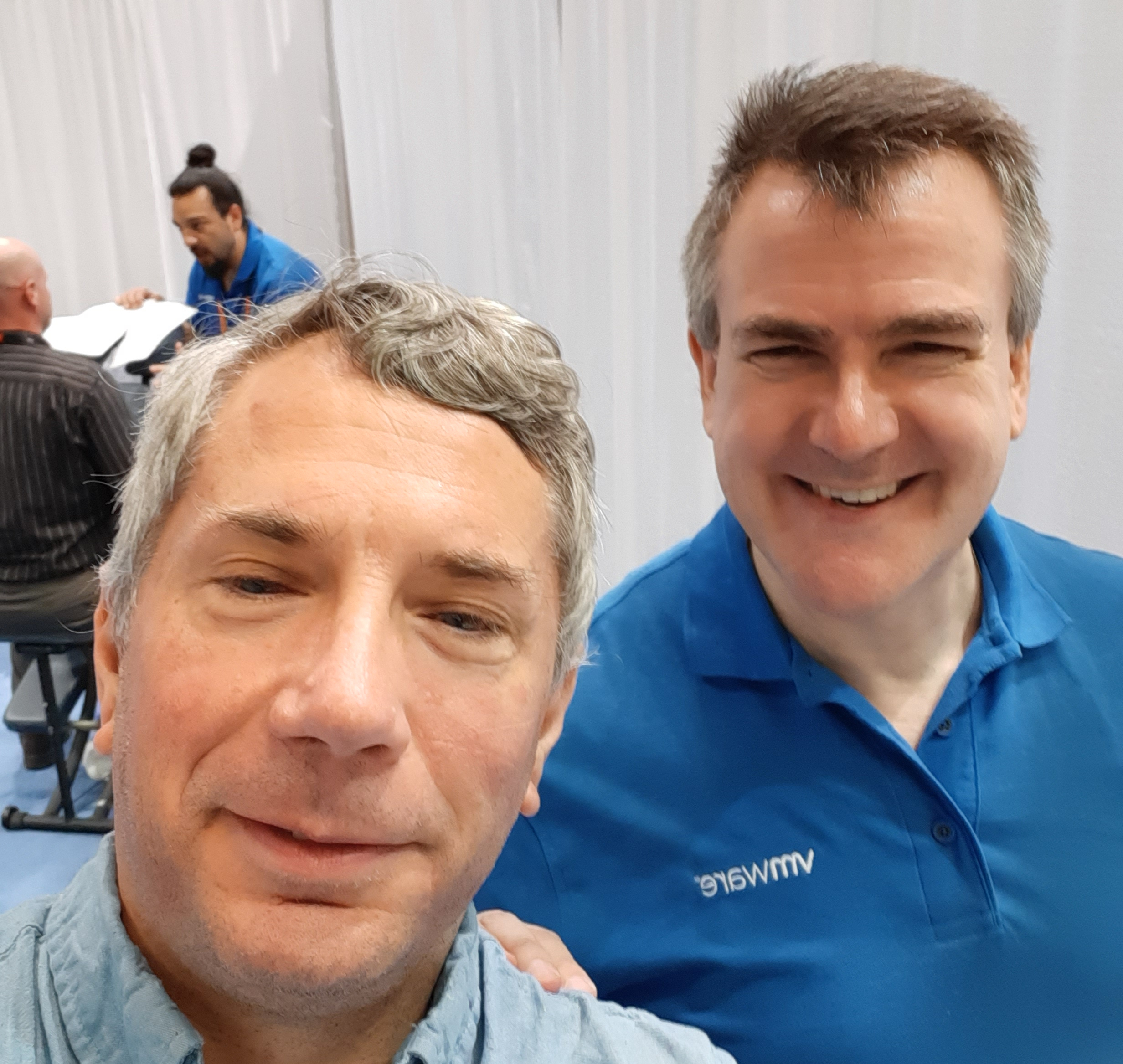
20191106_123733

After a great massage courtesy VMWare.

And we’ll miss out on:

20191105_143514

Achievement unlocked: PASS Summit 2019 Selfie with Angela Tidwell!

But, we’ll still have a LOT of great training and vendors will have virtual rooms and more.

So what’s the opportunity? Accessibility!

Here’s the thing, I LOVE PASS Summit. I think it’s a great training and learning opportunity. But let’s face it. It can get expensive, especially when you figure in travel costs, hotel costs and food costs. This year though, most of those costs disappear. This means that when you go to your boss, they have even less of an excuse to say, “sorry it’s not in the budget”.  And honestly, if they DO say that, I would seriously suggest that you consider paying for it out of your own budget. Yes, I realize money might be tight, but after all the wonderful training you can then update your resume and start submitting it to companies that actually invest in training their employees.

I would also add, from my understanding, while convention centers by law ADA accessible, this doesn’t necessarily mean everyone with a disability can attend. There can be non-physical barriers that interfere. Hosting virtually gives more people the ability to “attend” in a way that works for them. It might be in a quiet, darkened room if they’re sensitive to noise and lights. It might be replaying sessions over and over again if they need to hear things in that fashion. It very well could be taking advantage of recorded sessions and the like in ways that I, an able-bodied person isn’t even aware of. So that’s a second way in which it’s accessible.

Now, I know folks are questioning “well if its virtual, why should we pay anything, especially if vendors are still paying a sponsorship fee?” There’s several answers to that and none of them by themselves are complete, but I’ll list some. For one, I haven’t confirmed, but I’m fairly confident that vendors are paying a lot less for sponsorship, because they won’t get the same face to face contact. For another, PASS takes money to run. While we often think of it as a single big weeklong event, there’s planning and effort that goes on throughout the year. This is done by an outside organization that specializes in running organizations like PASS. (Note the PASS Board is still responsible for the decision making that goes on and the direction of PASS as a whole, but day to day operations are generally outsourced. This is far from uncommon. Those costs don’t disappear. There’s other costs that don’t automatically disappear because the event is no longer physical. And of course there are costs that a virtual event has that the physical event doesn’t. Now EVERY single session will be available as a live-stream (as well as recorded for later download) and this requires enough bandwidth and tools to manage them. And it requires people to help coordinate.  Making an event virtual doesn’t automatically make it free to run.

The Future

Now, I know right now I’m on track for hosting the NCRC Weeklong Cave Rescue training event next year at the location we planned on for this year. Our hope of course is that by then COVID-19 will be a manageable problem. But in the meantime, I’ll keep practicing my skills and sharing my knowledge and when and where I can, caving safely. And as always willing to take new folks caving. If you’re interested, just ask!

I don’t know what PASS 2021 Summit will bring or even where it will be. But I know this year we can make the most of the current situation and turn this into an opportunity to turn PASS into something new and more affordable. Yes, it will be different. But we can deal with that. So, register today and let’s have a great PASS 2020 Summit in the meantime!  I look forward to seeing you there. Virtually of course!

“It’s a Jump to the left…

… and then a double-hop to the right.” Or something like that.

I’ve commented before on the fact that I’m a consultant. I enjoy it. People will ask me what I do, and it varies. At one client they refer to their VB app as “the database” and because they found an ad of mine on Google where I talked about database administration, they hired me. About 80% of the work I do for them is actually on the VB app or related, very little is actually what I’d consider traditional database work. But that’s ok, they’re a pleasure to work with and I enjoy the work. Another client I recently worked with, asked me to help them conduct an audit of their web based product and help them with some steps to make it more secure. I was more than happy to help.

And then there’s my largest, by far, client. I actually get to do a fair amount of work that most of my #sqlfamily would recognize as “database work”. But there, perhaps more than any other, I describe my duties as “DBA and other duties as assigned.”  So between the work at this client and all my other clients, I’m often jumping or stepping around stuff.

The Double-Hop

This time though I was asked to double-hop. What is that exactly? It’s an issue that has to do with how Windows can pass security credentials from one server to another. This article, while old, describes it well. This was essentially the situation my client was trying to solve: Users needed to use their Active Directory (AD) Credentials to log into the Reporting Server (RS_Server) and run a report that in turn accessed data on a separate database server (DB_Server), and thus, the double-hop. Now, from my point of view, this isn’t really database work, but since the reporting server talks to the database server it was dropped in my lap under “other duties as assigned.”

Now, honestly, this SHOULD be simple to solve. It wasn’t. One reason was in part because, like many companies, this client has a separate team that handles much of their infrastructure needs, such as AD requests. And they have to go through tickets. To be clear, I support this concept, in theory. In practice, it can often take 2-3 weeks for even simple requests to go through. This meant that my first attempt at solving the double-hop failed. Their IT department did exactly what I requested. Unfortunately there was a typo in my ticket. So it failed. So round two. And round two didn’t work. Nor did round three. At this point though it wasn’t due to typos or mistakes on my end.

I started reading every article I could. My great editor at Red-Gate, Kathi Kellenberger has one, and trust me I wasn’t too shy to ask at that point! But nothing was working. I even asked another DBA at the client (they actually head up a different group and is their lead DBA). She pointed me to one of her people saying, “talk to him, he solved it.” I did, and he hadn’t. His solution was the one we were trying to avoid (basically using a fixed user in the datasource).

Frustration Sets In

I was getting frustrated. Fortunately at this point I started to exploit a loophole in the ticketing process. Since the problem wasn’t being fixed, I was able to keep it open and ended up getting assigned someone from their IT group who was as interested in fixing this as I was. This meant rather than “open a ticket, wait 1-2 weeks, have ticket be closed as complete, test, find out it failed, rinse” we could now actually schedule Zoom sessions and make changes in real-time. AND…. nothing we tried worked.

At this point you’re probably saying, “Yeah, yeah, get to the point. Did you solve it?”  The answer is yes, but I wanted you to feel a bit of my pain first, and I needed to make this post long enough to make it worth posting.

A Solution!

Now, let me say, I wish I could write out an exact recipe card solution for you. For various reasons, I can’t. But bear with me.

Finally, we found an additional resource in the IT group who had solved this before. His first recommendation was yet again, the solutions I mentioned above. He saw they didn’t work, agreed we were trying the right thing. So he said, “well let’s try a solution known as “Resource-based Kerberos Constrained Delegation“. This didn’t work at first either.

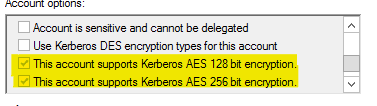
But then he suggested that we turn on 128 and 256 bit encryption on the DB_Server SQL account. Bingo that worked. Mostly. More on that in a second.

So here’s the setup we ended up with.

  1. RS_Server – running reporting services under an account domain\RS_Server_Service
  2. DB_Server – running SQL Server under an account domain\DB_Server_Service
  3. Setup some SPNs
    1. MSSQLsvc/DB_Server domain\DB_Server_Service
    2. MSSQLsvc/DB_Server.domain.com domain\DB_Server_Service
    3. Note in this case you do not appear to need one on the RS_Server side.
  4. Run a Powershell script
    1. $FEIdentity1 = Get-ADUser -Identity domain\RS_Server_Service
    2. $BEIdentity = Get-ADUser -Identity domain\DB_Server_Service
    3. Set-ADuser $BEIdentity -PrincipalsAllowedToDelegateToAccount $FEIdentitity1
  5. At this point things should have worked, but they didn’t until we then enabled the encryption options:

    encryption options for Kerberos

    Kerberos Encryption

  6. Then on our test box, things magically worked! Ok, not quite magically, but things worked. We had a solution.

And I was even more ecstatic when later that day, I tested this on a second report server box we had and it too suddenly was working without any changes. And this was a box where we had NOT even setup an SPN for the original double-hop solution, so I was pretty confident that the Resource-based Kerberos Constrained Delegation was working. In addition, in the rsserver.config file, the only authentication enabled was NTLM.

The next step was to try this on a production server. In that case, I did have to reconfigure the service it was running under to use the domain account domain\RS_Server_Service.

And… my test failed.

I was at wit’s end. I couldn’t quite figure out what was different. I checked my service names, my SPNs, the rsserver.config file, and more. Nothing was working. I took a break and came back and had an idea. In the datasource I changed it from:

Data source=DB_Server;Initial Catalog=TestDB

to

Data source=DB_Server.domain.com;Initial Catalog=TestDB

Bingo, it worked! A little digging confirmed my suspicion. This client actually has multiple DNS domains and the ordering and like under the TCP/IP settings was different on this box from the other two boxes. And that made the difference.

Sure enough when I tried deploying to a fourth box, I had the same issue, but changing it to the Fully Qualified Domain Name (FQDN) solved my issue.

So, my take-aways for this week:

  •  Resource-based Kerberos Constrained Delegation may be a better solution at solving the Double-Hop solution than the solution generally proposed.
  • Once you’ve setup the “target” SQL Server service account and source Reporting Server Service accounts, additional reporting servers can be added to the mix without needing assistance from a domain admin.
  • It appears you still need an SPN (well multiple) for the SQL Server itself.
  • You need to run a PowerShell Script to setup the accounts. Note that if you run it again, it overwrites the old settings, so you need to add ALL of the source accounts in a single step.
  • Depending on your domains security setup, you may need to enable 128/256 bit Kerberos authentication.
  • DNS resolution may determine if you can use just the NetBIOS name or the FQDN in your data sources.
  • This solution will NOT work if you need to cross domains or have more complex setups, but in general, it can be simpler to setup and to maintain, especially if you have limited access to making changes to AD in the first place.
  • My reading indicates this only works on Windows 2012 and beyond. But you shouldn’t be running older versions of Windows in any case!

If I get the time and energy, I may setup a test environment in my home lab to further experiment with this and write up better demos, but for now, use this as you can. Hopefully it’ll save you some of the stress I experienced.

And that’s it from here, back to other duties as assigned.


Social !Distancing

As some of my #SQFamily knows, Mike Walsh has been hosting a Friday afternoon Zoom “social hour”. It’s a chance for all of us who are social distancing to hang out, chat and basically socialize.

This past Friday, and then Monday night was a real reminder of how much I love my #sqlfamily.  Earlier in the day, my client asked me to come up with a script to back up some SSAS databases. A bit surprising to me, there isn’t the robust built-in support for this like there are for the normal databases. No problem some googling quickly brought me to an article on how to do it using PowerShell by Jana Sattainathan. Now as any of my readers know, I’m a huge fan of PowerShell, so this was a great solution. I had to tweak it a bit for my needs, but not much.  So I was already happy that someone else had done the work for me. For one thing it meant I could finish my day a bit earlier and get on the Zoom call with #SQLFamily.

Well, what do you know, but during the call as we’re talking Kevin Hill happens to mention he’s having trouble with a script to backup SSAS databases. I immediately chimed in, “hey, I’ve got a working script, let me email it to you!”  Ten minutes later he was up and running and contacted me back. Turns out he had found the same article by Jana but got hung up on the fact Get-ChildItem there needs DEFAULT for the $instancename when dealing with the default instance. As most of my readers would understand, usually if you’re referring to the default instance, you don’t need to explicitly reference it. I had encountered this issue writing one of my first articles for RedGate.

So I’d like to say I solved Kevin’s problem, but truth is it really goes back to Jana.

Meanwhile on the call, there was a discussion of the work being done by #SQLFamily for the @FoldingatHome project, being led by Glen Berry I believe. Others, led by Tim Radney are printing clips to help hold N95 masks on. (If I’m leaving out folks or getting names or credit wrong, please let me know).

Monday night we hosted our local SQL Server User Group meeting, but virtually. We had between 9-12 people on line at any time, which is not bad considering that’s about 1/2 of what we usually have in person. We had no specific topic, other than simply catching up on each other and how folks were dealing with the current crisis. Meanwhile I learned of at least one other virtual User Group meeting going on. Our #SQLFamily is still finding a way to share knowledge at this time.

So for all these reasons, I love my #SQLFamily (but still insist they stay at least 6′ away for now!)